목차
Feast
개요
- Feature Store로서 머신러닝 Feature를 실시간으로 관리하고 제공하는 시스템
- 공식사이트 주소: https://docs.feast.dev/
- 깃헙 주소: https://github.com/feast-dev/feast
제공 기능
- 파이썬 SDK를 통해 features, entities, sources, transformations 등을 정의할 수 있음
- 파이썬 SDK를 통해 오프라인 저장소, 온라인 저장소에 저장해둔 feature를 사용할 수 있음
- 파이썬 외에도 읽기 및 쓰기를 위한 feature 서버 제공
- feature를 탐색할 수 있는 UI 제공
- feature 확인 및 업데이트 할 수 있는 CLI 도구
장점
- feature를 지속적으로 사용할 수 있게 함 (offline/online store를 이용하여)
- data leakage 를 방지함 (point-in-time correct featue set을 이용하여)
- ML과 인프라를 분리시킬 수 있음 (single data access layer를 생성함으로써)
아키텍처
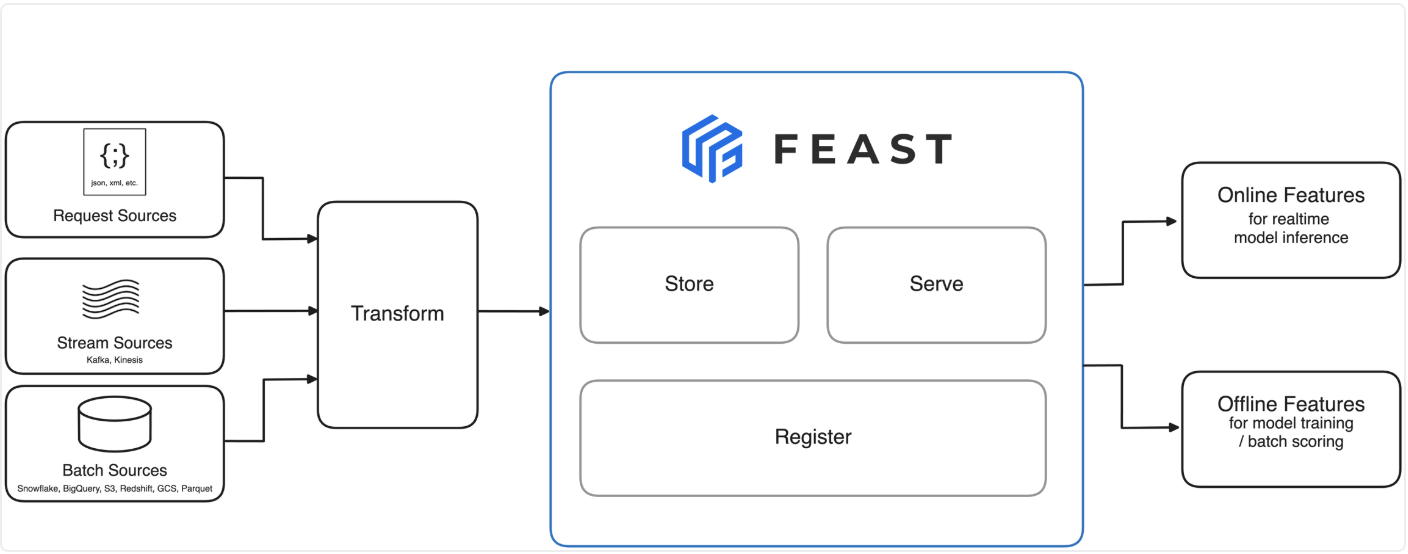
Feast 아키텍처 (출처: FEAST 공식 홈페이지)
- Push Model
- 다른 소스로부터 데이터를 받아서 online store로 피처를 push함
- low-latency로 real-time하게 데이터를 제공
- Feature Transformation Engine
- Streaming Data에 대해서 변환 기능을 제공
- Write Pattern
- communication pattern(동기식/비동기식), feature value write patter(사전계산/온디맨드/혼합) 과 같은 패턴을 조합
- 데이터 일관성, 정확성, 서비스 결합도, 대기시간 등의 trade-off를 조절할 수 있는 기능 제공
- 상세 내용: https://docs.feast.dev/getting-started/architecture/write-patterns
- Role-Based Access Control (RBAC)
- 조직 내 유저별 접근 제한을 통해 보안 기능 제공
Concepts
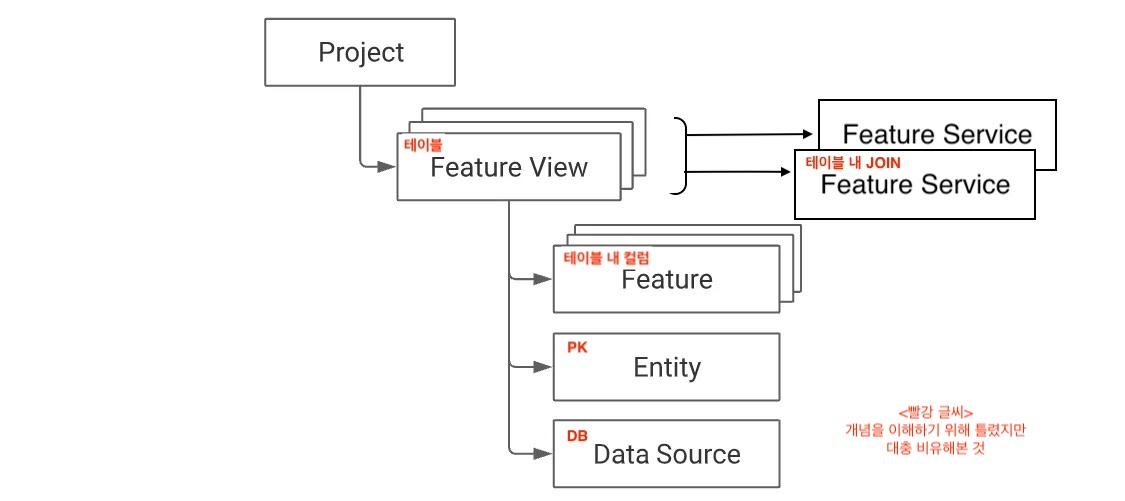
Feast 내 개념(Concept) 관계도
0. Project
- https://github.com/feast-dev/feast/blob/v0.41-branch/docs/getting-started/concepts/project.md
- Feature Store의 인프라구조 레벨로서 서로 다른 프로젝트로부터 피처를 받을 수 없음
- 추천: 하나의 피처스토어와 함께 환경별로(dev, staging, prod) 하나의 프로젝트를 가질 것
1. Data Ingestion
Data source
- raw underlying data를 관리하지 않고, 이미 DW/데이터레이크 같은 데이터 소스에 저장된 데이터를 수집함
- Feast는 데이터를 나타내기 위해 시계열 데이터 모델(time-series data model)을 사용함
- 기본적으로 Stream 데이터는 수집할 수 없어 유저가 push 를 해줘야 함
(하지만, 일부 Kafka, Kinesis의 토픽을 직접적으로 수집하는 제한된 헬퍼 메서드가 있긴 함) - 크게 Batch, Stream, Request data sources 로부터 데이터를 받음
Batch data ingestion
materialize_incremental: 모든 엔터티에 대해 가장 최근 데이터를 가져오는 명령어schemaparameter가 명시되지 않으면 Feast는feast apply시 스키마를 추론- 추론 방식은 오프라인 저장소마다 다름. 스키마 검사 수행, LIMIT절을 사용한 쿼리가 소스에서 제공 시 사용 등등
Stream data ingestion
- Push API: Push
from feast import Entity, PushSource, ValueType, BigQuerySource, FeatureView, Feature, Field, FeatureStore
from feast.types import Int64
from feast.data_source import PushMode
import pandas as pd

push_source = PushSource(
    name="push_source",
    batch_source=BigQuerySource(table="test.test"),
)

user = Entity(name="user", join_keys=["user_id"])

fv = FeatureView(
    name="feature view",
    entities=[user],
    schema=[Field(name="life_time_value", dtype=Int64)],
    source=push_source,
)

fs = FeatureStore(...)
feature_data_frame = pd.DataFrame()
fs.push("push_source_name", feature_data_frame, to=PushMode.ONLINE_AND_OFFLINE)- contrib Spark 프로세서를 이용하는 방법
2. Entity
의미적으로 연결된 피처들의 집합(개인적으로 교집합 or 기준점)
각 엔터티별로 특정 도메인에 맵핑시켜 모델링하는 데 사용. 쉽게 PK 역할로 보면 됨!!
driver = Entity(name='driver', join_keys=['driver_id'])- entity name: 엔티티를 유일하게 식별하는데 사용
- join key: 해당 엔티티의 PK가 되는 컬럼명
Defining and storing features
- Feast의 주요 객체인 Feature View는 피처들의 집합이고 이는 0개 이상의 엔터티와 맵핑됨
- zeor entities (예시. global feature -> num_daily_global_transations)
- one entity (예시. a user feature -> user_age or last_5_bought_items)
- multiple entity (예시. user + merchant category feature -> num_user_purchases_in_merchant_category)
- 이 때, Feature view의 엔터티 집합을 entity key라고 부름
- 해당 엔터티들은 여러 Feature view에 걸쳐 재사용됨
Retrieving features
- 훈련 시에, 엔터티 별로 원하는 시간대를 설정할 수 있음
- train/test/validation 스플릿 중
- 훈련 시에는 entity key + timestamps를 통해 훈련에 필요한 데이터셋을 생성할 수 있고,
- 추론 시에는 entity key 내 가장 최신의 정보만을 가지고 예측에 사용할 수 있음
3. Feature View
Feature views
참고) Feature view는 non-timstamped 데이터에서는 동작하지 않아서, 더미 timestamps라도 주입해야 함- 특정 데이터 소스(배치 데이터, 스트리밍 데이터 등등)에서 정의된 Feature 들의 논리적인 집합 -> 거의 테이블에 가까운 듯!
- time-series feature 데이터의 논리적 그룹을 나타내는 객체
- Feature view의 종류에 따라 피쳐 변환을 포함할 수도 있음 (아래 "[Alpha] On demand feature views" 에서 확인 가능)
- 참고로, 하나의 training dataset을 위해서 여러 Feature View가 필요할 수 있음
- 구성요소
- 데이터소스
- 0개 이상의 엔터티
- Feature view 이름 (프로젝트 내에서 유일하게 존재해야 함)
- (Optional, 권장) Feature에 대한 스키마 (없으면 추론)
- (Optional, 권장) 메타데이터
- (Optional) TTL - historical 데이터 조회 시 얼마나 과거를 조회할지 제한
from feast import BigQuerySource, Entity, FeatureView, Field
from feast.types import Float32, Int64

driver = Entity(name="driver", join_keys=["driver_id"]) # Entity

# One Entity Feature View
driver_stats_fv = FeatureView(
    name="driver_activity",
    entities=[driver],
    schema=[
        Field(name="trips_today", dtype=Int64),
        Field(name="rating", dtype=Float32),
    ],
    source=BigQuerySource(
        table="feast-oss.demo_data.driver_activity"
    )
)

# Zero Entity Feature View
global_stats_fv = FeatureView(
    name="global_stats",
    entities=[],
    schema=[
        Field(name="total_trips_today_by_all_drivers", dtype=Int64),
    ],
    source=BigQuerySource(
        table="feast-oss.demo_data.global_stats"
    )
)
Feature inferencing
schema파라미터를 이용하지 않으면feast apply단계에서 Feast가 추론하여Field를 생성함- 단, 엔터티의 Feature와 일치하는 컬럼이거나 데이터소스에서 타임스탬프 컬럼에 해당하는 경우 제외
Entity aliasing
entity_dataframe의 컬럼명과 Feature View의 소스테이블에 있는 컬럼명이 일치하지 않을 때 지정- 컬럼 이름을 제어할 수 없거나 "user" 엔터티가 "spammer", "reporter"와 같은 별칭으로 사용될 수 있다는 것
.with_name과.with_join_key_map을 사용
from feast import BigQuerySource, Entity, FeatureView, Field
from feast.types import Int32, Int64

location = Entity(name="location", join_keys=["location_id"])

location_stats_fv= FeatureView(
    name="location_stats",
    entities=[location],
    schema=[
        Field(name="temperature", dtype=Int32),
        Field(name="location_id", dtype=Int64),
    ],
    source=BigQuerySource(
        table="feast-oss.demo_data.location_stats"
    ),
)

temperatures_fs = FeatureService(
    name="temperatures",
    features=[
        # Entity aliasing from location_stats_fv to origin_stats with join key mapping origin_id
        location_stats_fv
            .with_name("origin_stats")
            .with_join_key_map(
                {"location_id": "origin_id"}
            ),
        # Entity aliasing from location_stats_fv to destination_stats with join key mapping destination_id
        location_stats_fv
            .with_name("destination_stats")
            .with_join_key_map(
                {"location_id": "destination_id"}
            ),
    ],
)
Field(Feature)
- 개별적으로 측정 가능한 속성
- 엔터티와 연관이 있을 수도 있고, global 변수처럼 엔터티와 상관 없을 수도 있음
- Field는 Feature view의 부분으로서 정의되고 이름과 데이터 유형을 포함하는 스키마를 필수적으로 가짐
- 구성요소
- 이름: 하나의 Feature View 내에서 유일해야 함
- 데이터 유형:
sdk/python/feast/types.py에서 사용 가능한 리스트 확인 가능 - 태그: 버전, 설명과 같은 메타데이터 관리 가능
from feast import Field
from feast.types import Float32

trips_today = Field(
    name="trips_today",
    dtype=Float32
)

location_stats_fv= FeatureView(
    schema=[
        Field(...)
    ],
)
[Alpha] On demand feature views
- 요청 시에만 사용할 수 있는 데이터를 변환하여 새로운 피처를 만들어 사용할 때 필요함
- 이 기능은 로컬에서 실행하여 online serving은 크기가 작아서 괜찮지만 offline retrieval로 스케일 업은 어려울 수 있음
- 예시) 실시간 추천 시스템
- 사용자가 요청 시점에 입력한 데이터를 기존 사용자 행동 데이터와 결합하여 새로운 피처를 생성
- 아래 코드 설명
@on_demand_feature_view()를 사용하여transformed_conv_rate함수를 적용- 최종적으로
conv_rate_plus_val1,conv_rate_plus_val2변수를 생성
from feast import Field, RequestSource
from feast.types import Float64
from feast.on_demand_feature_view import on_demand_feature_view

# RequestSource는 요청 시점에 사용 가능한 Feature를 인코딩하는 데이터 소스 (e.g. HTTP 요청)
input_request = RequestSource(
    name="vals_to_add",
    schema=[
        Field(name="val_to_add", dtype=PrimitiveFeastType.INT64),
        Field(name="val_to_add_2": dtype=PrimitiveFeastType.INT64),
    ]
)

# Input Data와 Feature View의 Feature를 사용하여 새로운 Feature를 생성
@on_demand_feature_view(
   sources=[
       driver_hourly_stats_view,
       input_request
   ],
   schema=[
     Field(name='conv_rate_plus_val1', dtype=Float64),
     Field(name='conv_rate_plus_val2', dtype=Float64)
   ]
)
def transformed_conv_rate(features_df: pd.DataFrame) -> pd.DataFrame:
    df = pd.DataFrame()
    df['conv_rate_plus_val1'] = (features_df['conv_rate'] + features_df['val_to_add'])
    df['conv_rate_plus_val2'] = (features_df['conv_rate'] + features_df['val_to_add_2'])
    return df
[Alpha] Stream feature views
- 기존 Feature view는 batch 데이터 소스만 접근 가능하다면 이는 stream 데이터 소스까지 모두 접근 가능
- stream 데이터 소스는 Kafka, Kinesis 같은 것들로 해당 데이터 소스는 기존 Feature view로는 접근이 되지 않음
from datetime import timedelta

from feast import Field, FileSource, KafkaSource, stream_feature_view
from feast.data_format import JsonFormat
from feast.types import Float32

# 배치 데이터 소스 정의 -> 여기서는 파일 기반 데이터로, 과거 데이터를 로드하는 데 사용
driver_stats_batch_source = FileSource(
    name="driver_stats_source",
    path="data/driver_stats.parquet",
    timestamp_field="event_timestamp",
)

# 스트림 데이터 소스 정의 -> Kafka 기반 데이터로, 실시간 데이터를 수집하는 데 사용
driver_stats_stream_source = KafkaSource(
    name="driver_stats_stream",
    kafka_bootstrap_servers="localhost:9092", # Kafka 서버 주소
    topic="drivers", # Kafka 토픽 이름
    timestamp_field="event_timestamp",
    batch_source=driver_stats_batch_source, # 배치 데이터 소스
    message_format=JsonFormat( # 메시지 포맷 설정 (JSON 형식)
        schema_json="driver_id integer, event_timestamp timestamp, conv_rate double, acc_rate double, created timestamp"
    ),
    watermark_delay_threshold=timedelta(minutes=5),
)

# 스트림 Feature View 정의: 스트림 데이터 소스를 사용하여 실시간 데이터를 처리하고 변환
@stream_feature_view(
    entities=[driver],
    ttl=timedelta(seconds=8640000000), # Time to live(데이터 보존 기간)
    mode="spark", # 스트림 처리 모드 (spark, kafka)
    schema=[
        Field(name="conv_percentage", dtype=Float32),
        Field(name="acc_percentage", dtype=Float32),
    ],
    timestamp_field="event_timestamp",
    online=True, # 온라인 서빙 여부
    source=driver_stats_stream_source, # 스트림 데이터 소스
)
def driver_hourly_stats_stream(df: DataFrame):
    from pyspark.sql.functions import col

    # 데이터프레임에 변환 로직 적용
    return (
        df.withColumn("conv_percentage", col("conv_rate") * 100.0)
        .withColumn("acc_percentage", col("acc_rate") * 100.0)
        .drop("conv_rate", "acc_rate")
    )
4. Feature Retrieval
피처 반환 패턴
Training 데이터 셋 생성 & Offline feature retrieval
feature_store.get_historical_features(...)
Online feature retrieval for real-time model predictions
SDK:
feature_store.get_online_features(...)Deployed feature server endpoints:
requests.post(
  'http://localhost:6566/get-online-features',
  data=json.dumps(online_request)
)
Feature service
- 하나 이상의 Feature views를 조합한 Feature의 논리적인 집합
- 보통, ML model 버전별로 하나의 Feature service를 맵핑함
- 사용
- Training 데이터 셋 생성
- Offline store의 Feature 반환 (entity dataframe의 timestamp는
now()) - Online store의 Feature 반환
from driver_ratings_feature_view import driver_ratings_fv
from driver_trips_feature_view import driver_stats_fv
from feast import FeatureStore

# Feature service 객체 정의
driver_stats_fs = FeatureService(
    name="driver_activity",
    features=[driver_stats_fv, driver_ratings_fv[["lifetime_rating"]]]
)

# Feature store 초기화
feature_store = FeatureStore('.')

# Feature service 객체 반환
feature_service = feature_store.get_feature_service("driver_activity")

# 1) Feature 조회 from online store
features = feature_store.get_online_features(
    features=feature_service, entity_rows=[entity_dict]
)

# 2) Feature 조회 from offline store
feature_store.get_historical_features(features=feature_service, entity_df=entity_df)
Feature Reference
해당 개념은 실험 시에만 사용하는 것을 추천하고 서빙 시에는 Feature Service를 권장
Feature 반환은 아래와 같은 방식으로도 가능
Feature Service 대신에
<feature_view>:<feature>를 사용online_features = fs.get_online_features( features=[ # <feature_view>:<feature> 'driver_locations:lon', 'drivers_activity:trips_today' ], entity_rows=[ # {join_key: entity_value} {'driver': 'driver_1001'} ] )
Event timestamp
- Feature view의 데이터 소스에서 해당 이벤트가 발견 또는 생성된 timestamp
- 이는 point-in-time 조인 시 사용되고 Entity rows의 최신 행을 유지하는데 사용
Dataset
- 훈련에 필요한 historical retrieval로 이루어진 rows의 집합
- Feature views의 조인을 통해 생성됨
- Dataset vs Feature View
- Feature view는 데이터 스키마 및 데이터 소스에 대한 데이터를 포함함
- Dataset은 이러한 데이터 소스에 대한 쿼리 후 구체화, 실체화 된 데이터를 의미함
- Dataset vs Data Source
- historical retrieval 의 결과로서 Data Source는 해당 input으로 사용됨
- 하나의 Dataset을 만들기 위해 1개 이상의 Data Source가 사용됨
1) Retrieving historical features
get_historical_featuresAPI를 사용하여 point-in-time join을 추상화 함(1) Features 명시화
- feature service 또는 feature references list 에 쿼리
# querying a feature service (recommended)
training_df = store.get_historical_features(
    entity_df=entity_df, # or entity_sql(아래에 설명)
    features=store.get_feature_service("model_v1"),
).to_df()

# querying a list of feature references
training_df = store.get_historical_features(
    entity_df=entity_df, # or entity_sql(아래에 설명)
    features=[
        "driver_hourly_stats:conv_rate",
        "driver_hourly_stats:acc_rate",
        "driver_daily_features:daily_miles_driven"
    ],
).to_df()
(2) Entity 명시화
- Pandas dataframe 또는 SQL query 를 통해 엔터티 명시화
- Full entity key 와 timestamps 가 필요하고 최종적으로 이 데이터프레임을 통해 Feature를 조인함
# entity Pandas dataframe
entity_df = pd.DataFrame.from_dict(
  {
      "driver_id": [1001, 1002, 1003, 1004, 1001],
      "event_timestamp": [
          datetime(2021, 4, 12, 10, 59, 42),
          datetime(2021, 4, 12, 8, 12, 10),
          datetime(2021, 4, 12, 16, 40, 26),
          datetime(2021, 4, 12, 15, 1, 12),
          datetime.now()
      ]
  }
)

# entity SQL query
entity_sql = f"""
  SELECT
      driver_id,
      event_timestamp
  FROM {store.get_data_source("driver_hourly_stats_source").get_table_query_string()}
  WHERE event_timestamp BETWEEN '2021-01-01' and '2021-12-31'
"""
2) Retrieving online features
가장 최신의 Feature value를 반환하고 이 때, entities 리스트와 Feature 리스트가 필요함
get_historical_features와 유사하게 Feature Service 사용을 권장차이점은
entity_rows에 timestamp를 포함할 필요가 없음(1) Python SDK
  from feast import RepoConfig, FeatureStore
  from feast.repo_config import RegistryConfig

  repo_config = RepoConfig(
      registry=RegistryConfig(path="gs://feast-test-gcs-bucket/registry.pb"),
      project="feast_demo_gcp",
      provider="gcp",
  )
  store = FeatureStore(config=repo_config)

  features = store.get_online_features(
      features=[
          "driver_hourly_stats:conv_rate",
          "driver_hourly_stats:acc_rate",
          "driver_daily_features:daily_miles_driven",
      ],
      entity_rows=[
          {
              "driver_id": 1001,
          }
      ],
  ).to_dict()
(2) Feature Server
- Feature Server를 배포한 뒤 사용 가능 (Python feature server)
import requests
import json

online_request = {
  "features": [
      "driver_hourly_stats:conv_rate",
  ],
  "entities": {"driver_id": [1001, 1002]},
}
r = requests.post('http://localhost:6566/get-online-features', data=json.dumps(online_request))
print(json.dumps(r.json(), indent=4, sort_keys=True))
5. Point-in-time joins
- Feature View들의 시간별 JOIN 작업을 매우 쉽게 사용 가능
- 아래 예시에서는 TTL을 2시간으로 설정. Entity DataFrame을 기준으로 timestamp가 2시간 이내인 데이터 중 가장 최신 데이터를 JOIN함
Feature View(Y:target)
Entity DataFrame(X:feature)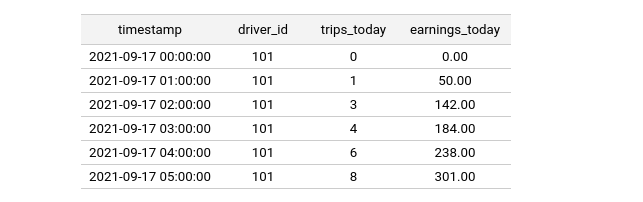
Point-in-time JOIN 로직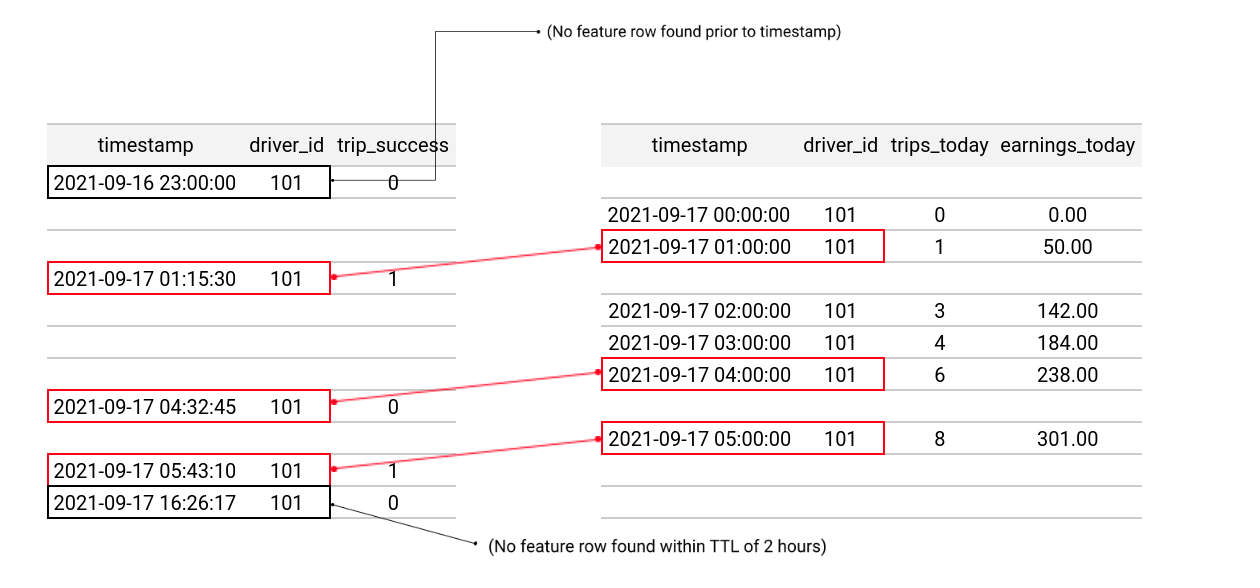
JOIN 결과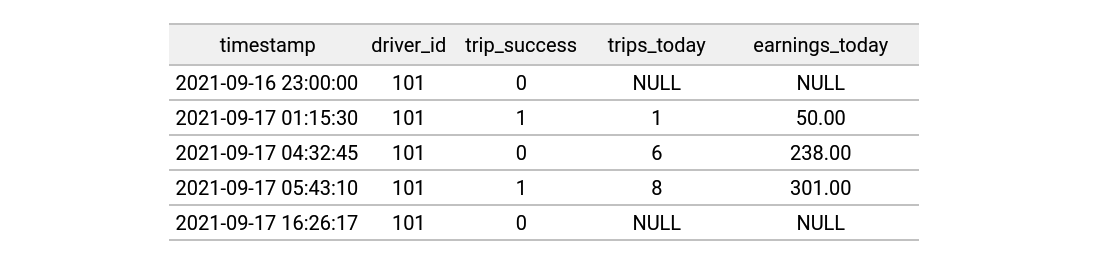
- 코드는 단순 "get_historical_features" API에서 자동으로 수행함
from feast import Entity, FeatureView, Field, FileSource
from feast.types import Float32, Int64
from datetime import timedelta

driver = Entity(name="driver", join_keys=["driver_id"])

# Feature View 정의 (X:feature)
driver_stats_fv = FeatureView(
    name="driver_hourly_stats",
    entities=[driver],
    schema=[
        Field(name="trips_today", dtype=Int64),
        Field(name="earnings_today", dtype=Float32),
    ],
    ttl=timedelta(hours=2),
    source=FileSource(
        path="driver_hourly_stats.parquet"
    )
)

# Entity DataFrame 정의 (Y:target)
entity_df = pd.read_csv("entity_df.csv")

# Point-in-time JOIN
training_df = store.get_historical_features(
    entity_df=entity_df,
    features = [
        'driver_hourly_stats:trips_today',
        'driver_hourly_stats:earnings_today'
    ],
)
주의할 점
❗️TTL은 쿼리를 실행할 때의 현재 시점이 아니라 entity dataframe의 timestamp를 기준으로 함❗️Components
Feast 내 요소(components) 관계도

기능(Functionality)
Functionality Description Create Features • 배치: Spark, SQL로 배치 store 내에 transform 데이터를 생성 • 스트림: Kafka, Kinesis에서 PushAPI로 Feast에 직접 Push Feast Apply 버전 관리된 Feature repository를 배포하여 Registry를 영구적으로 저장 Feast Materialize feast materialize를 통해 offline store에서 online store로 Feature를 로드Model Training Feast Python SDK를 통해 훈련 데이터셋을 반환시킬 수 있음 Get Historical Features point-in-time에 맞는 훈련 데이터셋 반환 (feature 리스트, entity dataframe 필요) Deploy Model 모델 서빙 시스템에 훈련된 모델을 배포한 것 (⭐이는 Feast에서 수행하지 않음) Prediction 백엔드 시스템이 요청하여 모델 서빙 시스템으로부터 예측값을 받는 것 Get Online Features Feast SDK를 통해 Feast Online Serving 서비스에 online feature를 요청 요소(Components)
Components Description Feast Registry Feature Store에 저장된 feature 정의를 저장하는 저장소(object storage(GCS, S3)) Feast Python SDK/CLI • Feature 정의에 관한 버전 관리 • Online Store로 Feature 값을 구체화/실현화 • Offline Store로부터 훈련 데이터셋을 빌드 및 반환 • Online Features 반환 Stream Processor 스트림 데이터를 수집하여 Offline/Online Store에 저장하는데 사용(제한적) Batch Materialization Engine Offline Store에서 Online Store로 데이터를 로드하는 프로세스를 (로컬에서) 실행 Online Store 각 Entity별 최신 Feature 값만 저장하는 DB로 materialization 작업 또는 stream ingestion으로 저장 Offline Store Feast에 수집된 배치 데이터를 저장하는 DB로 Feast에서 직접 관리하지 않고, 쿼리를 통해 데이터에 접근함 Authorization Manager authentication 토큰을 감지하여 권한 및 정책을 관리
1. Registry
- 모든 피처 정의 및 관련된 메타 데이터들을 중앙에서 관리하는 카탈로그
- Feast 객체들(e.g. Feature views, entities, etc)도 저장함
- Registry는 apply, list, retrieve object, delete object와 같은 메소드를 제공함
- 파일 기반 또는 SQL 기반으로 구현할 수 있음 (default: 파일기반)
- 상세 내용은 Registries 참고
Accessing the registry from clients
(1) 프로그래밍 방식으로 레지스트리 지정하기
  repo_config = RepoConfig(
      registry=RegistryConfig(path="gs://feast-test-gcs-bucket/registry.pb"),
      project="feast_demo_gcp",
      provider="gcp",
      offline_store="file",  # Could also be the OfflineStoreConfig e.g. FileOfflineStoreConfig
      online_store="null",  # Could also be the OnlineStoreConfig e.g. RedisOnlineStoreConfig
  )
  store = FeatureStore(config=repo_config)
(2)
feature_store.yaml파일에서 레지스트리 지정하기 (default)project: feast_demo_aws provider: aws registry: s3://feast-test-s3-bucket/registry.pb online_store: null offline_store: type: file- Feature Store 시작 시
store = FeatureStore(repo_path=".")를 실행함
- Feature Store 시작 시
2. Offline Store
설명
- 데이터 소스에 저장된 historical time-series 피처를 작업할 인터페이스
- 이는 다양한 구현체를 가지는데, 대표적으로
FileOfflineStore,BigQueryOfflineStore,SnowflakeOfflineStore등이 있음 - 상세 내용은 Offline Stores 참고
목적
- 훈련 데이터셋 생성
- 온라인 스토어로 피처를 적재(materialize)하여 low-latency로 프로덕션 환경에서 피처 제공
설정
feature_store.yaml 파일에서 Offline Store 설정 -> 구현체마다 다르므로 위의 링크 참고
<!-- feature_store.yaml 파일 예시 - BigQuery -->
project: my_feature_repo
registry: gs://my-bucket/data/registry.db
provider: gcp
offline_store:
  type: bigquery
  dataset: feast_bq_dataset

<!-- feature_store.yaml 파일 예시 - DuckDB -->
project: my_project
registry: data/registry.db
provider: local
offline_store:
    type: duckdb
online_store:
    path: data/online_store.db
오프라인 스토어는 한 번에 하나만 사용할 수 있고, 구현체와 다른 데이터 소스와는 호환되지 않음
- 예를 들어,
BigQuery오프라인 스토어는BigQuerySource와 호환되지만FileSource와는 호환되지 않음
- 예를 들어,
Push Source
- 실시간으로 온라인 스토어와 오프라인 스토어에 피처 값을 푸시할 수 있음
- 과거 FeatureStore.write_to_offline() 메소드를 대체함
- Push 소스는 여러 Feature View에 동시에 사용할 수 있고, Push 소스에 데이터가 푸시되면 Feast는 해당 피처 값을 Push 소스를 소비하는 모든 Feature View에 적재함
- 특징
- Push Source는 반드시 배치 소스를 지정하여 historical 데이터를 검색할 수 있어야 함
- 따라서, 유저는 배치 소스에도 데이터를 푸시해야 할 책임이 있음
import pandas as pd
from feast import Entity, PushSource, ValueType, BigQuerySource, FeatureView, Feature, Field, FeatureStore
from feast.types import Int64
from feast.data_source import PushMode

# Push Source 정의: 실시간 온라인/오프라인 스토어에 푸시 가능. 배치소스는 BigQuery 사용하여 과거 데이터 조회
push_source = PushSource(
    name="push_source",
    batch_source=BigQuerySource(table="test.test"),
)

user = Entity(name="user", join_keys=["user_id"])

# Feature View 정의
fv = FeatureView(
    name="feature view",
    entities=[user],
    schema=[Field(name="life_time_value", dtype=Int64)],
    source=push_source, # Push Source 사용
)

fs = FeatureStore(...)

# 푸시할 데이터 준비
feature_data_frame = pd.DataFrame()

# Push 소스를 사용하여 데이터프레임을 온라인 및 오프라인 스토어로 푸시
fs.push("push_source_name", feature_data_frame, to=PushMode.ONLINE_AND_OFFLINE) # ONLINE, OFFLINE, ONLINE_AND_OFFLINE
3. Online Store
여러 구현체가 존재하고 Feature를 low-latency로 제공할 수 있도록 Online Store에 저장해둠
상세 내용은 Online Stores 참고
feast materialize명령어 실행 시 Entity Key에 대한 최신 Feature 값만 저장함
예시) Data Source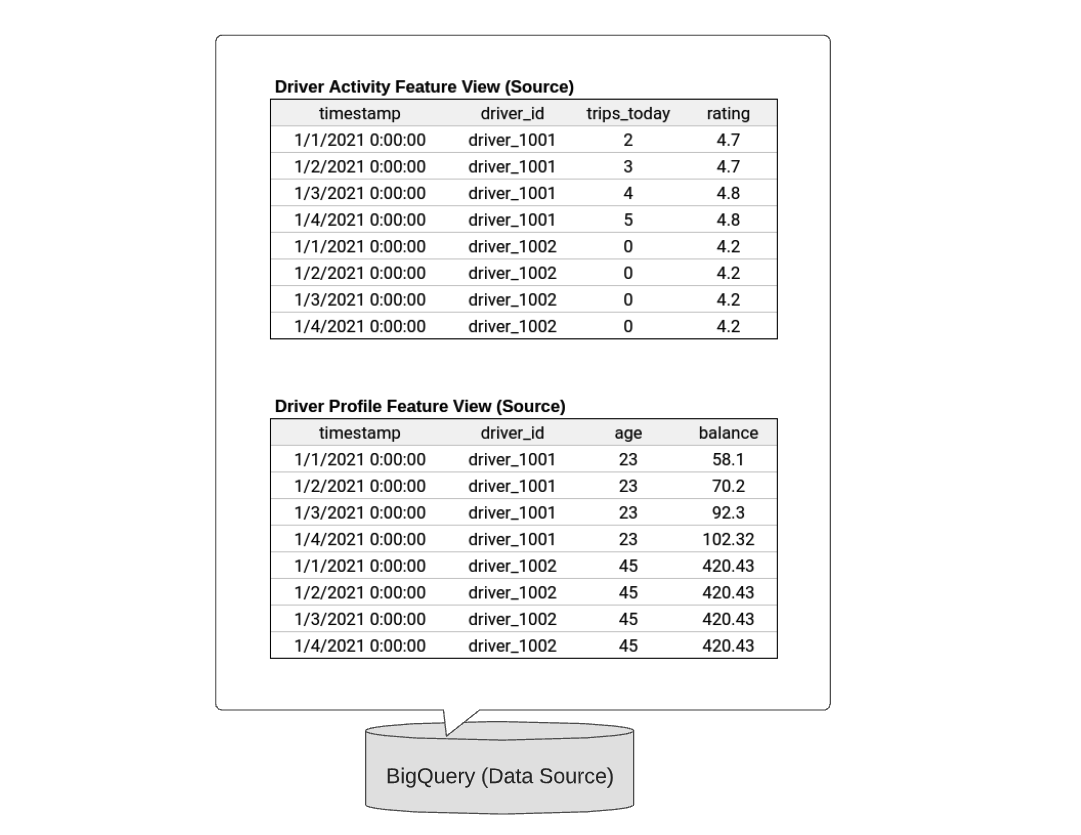
예시) Online Store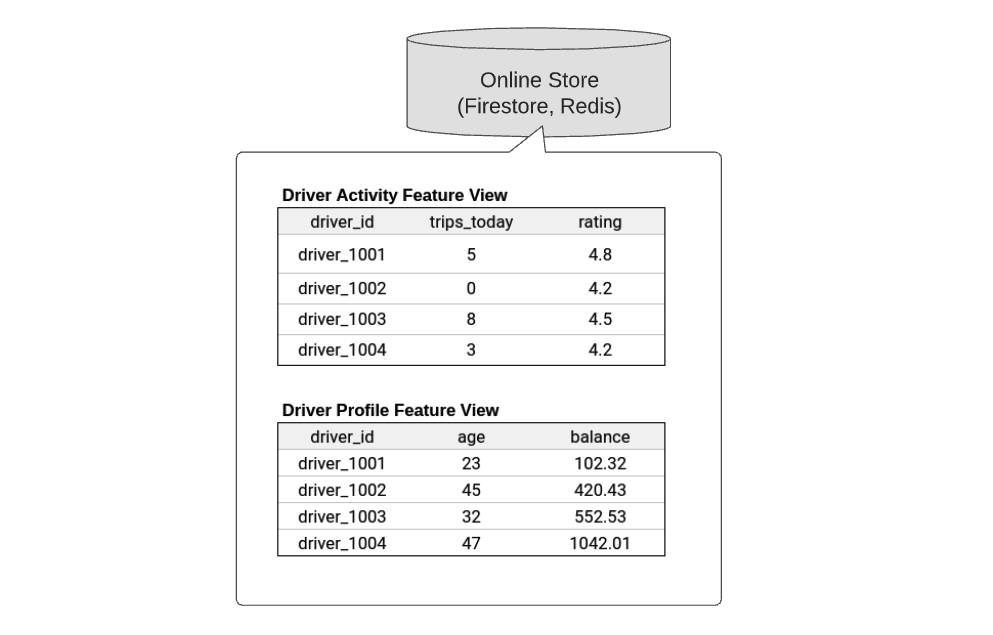
feature_store.yaml 파일에서 Online Store 설정 -> 구현체마다 다르므로 위의 링크 참고
<!-- feature_store.yaml 파일 예시 - SQLite -->
project: my_feature_repo
registry: data/registry.db
provider: local
online_store:
  type: sqlite
  path: data/online_store.db

<!-- feature_store.yaml 파일 예시 - DataStore -->
project: my_feature_repo
registry: data/registry.db
provider: gcp
online_store:
  type: datastore
  project_id: my_gcp_project
  namespace: my_datastore_namespace
4. Batch Materialization Engine
offline store에서 online store로 데이터를 로드하는 프로세스를 실행하는 엔진
Default:
LocalBatchMaterializationEngineAWS Lambda에 위임하여 작업할 수도 있음:
LambdaMaterializaionEngine이 외 Custom Batch Materialization Engine 은 해당 링크 참고
이는 feature_store.yaml 파일에서 설정할 수 있음
project: my_project
registry: s3://my_bucket/registry.db
provider: local

<!-- Local 엔진 사용 -->
materialization_engine:
  type: local

<!-- AWS Lambda 사용 -->
materialization_engine:
  type: lambda  # AWS Lambda Materialization Engine
  lambda_function_name: my_materialization_lambda  # 사용할 Lambda 함수 이름
  region: us-west-2  # AWS 리전
5. Provider
- Feature Store를 구현하기 위해 사용되는 구성 요소들을 조율하는 특정 환경을 의미함
local,aws,gcp가 있고, 온/오프라인 스토어, 컴퓨팅 등을 관리- 이는 feature_store.yaml 파일에서 설정할 수 있음
- 이 외 Custom Provider는 해당 링크 참고
6. Authorization Manager
AuthManager클래스의 인스턴스로, Feast 서버에서 현재 요청에서 유저의 권한을 관리함- Feast는 자체적으로 인증(Authorization) 기능을 제공하지 않으므로, 클라이언트가 인증 토큰을 관리하며 Feast에 전달해야함
- 상세 설명은 Authorization Manager 참고